
The practical workflow, start to finish
How sports video analysis software works: tag, playlist, export
This page is about the doing: what you press, what comes out the other end, and what it changes for the players. MatchFrame runs in a browser on the footage you already film, so the match is ready to code the moment the file lands.
7 days free · No card required · Any sport, any camera
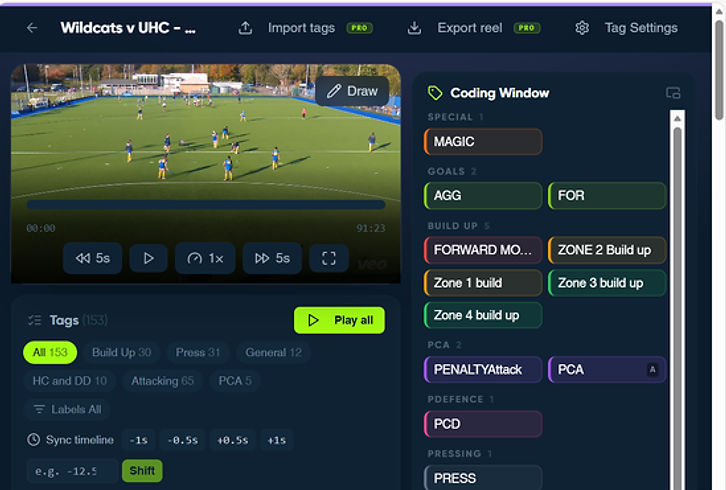
The workflow in four steps
From a file on your laptop to a reel on the players' phones
Four steps, each one inside the same match: nothing is re-encoded, nothing waits in a processing queue, and the clips are made by the tags rather than by editing.
- 01
Bring the footage you already have
Upload the file from the device you filmed on, or paste a direct video link and it streams in place. A phone recording, a camera card, a match downloaded from Veo or Hudl, a Dropbox share link — one file can be up to 20 GB, capped by your plan's storage. There is no camera to buy and nothing to install.
Library → add a match
- 02
Tag the moment as it happens
Play the match and press the key for what you see: a code you defined yourself, inside your own categories. Every tag becomes a clip automatically, and you can draw on the paused frame — a circle round a player, an arrow for the run, a line for the gap between them.
Coding window → your codes
- 03
Filter the moments into a playlist
Filter the coded moments by code, category or match and the matching clips collect in the order they happened. Because the same code is used on every match, the playlist stacks up across the season — a reel of every restart you lost makes an argument one match cannot.
Playlists → filter by code
- 04
Export the reel and send it
Play the playlist back with the drawings over the footage, then export it as a video reel that opens on a phone. Six to eight minutes, one question per reel, in front of the squad before the next session.
Playlist → export reel
Want the routine around the software — the camera, the coding window, the review with the squad? Read how to analyse sports video. To press the buttons yourself first, open the demo with sample footage.
What it changes
The point of coding a match is the conversation after it
The clips exist while the match is still fresh
Because the tag is the clip, there is no second pass in an editor afterwards. The reel for Monday's session is built from the match you watched on Saturday, not from a job you keep putting off.
One vocabulary, every match
Your codes stay put from week to week, so the same moment is called the same thing in September and in March. That is what makes a playlist of six matches mean something.
Feedback a player will actually watch
A reel lands on a phone with the drawings over the footage and your note beside it. Short and specific gets watched; a thirty-minute cut does not.
One place for the whole staff
On a Clubhouse, up to eight coaches share one library, one coding vocabulary and the same playlists, so the analysis does not live on one coach's laptop.
Seven days free with one match and no card needed, then £15 or £25 a month for one coach — or a whole club sharing one library for £150. See what each plan includes.
One workflow, any sport
The codes are yours, so the software is not tied to one game
- Football
- Rugby
- Hockey
- Basketball
- Netball
- Anything you film
You name the phases, the set pieces and the positions in the words you use on the training pitch, then reuse that coding template every match. Nothing in the app assumes a sport, a pitch shape or a competition. Try a coding window in the demo.
Questions about doing the work
Before you upload your first match
What does sports video analysis software actually do?
It turns match footage into short, labelled clips. You mark the moments that matter — a turnover, a lineout, a press — and the software keeps a clip of each one with your note and any drawing on the frame. Those clips then collect into playlists you can filter by what happened, and play back or export for the squad.
How long does it take to code a match in MatchFrame?
It depends on how many moments you code and whether you tag live. Tagging live off the match clock means the match is coded by full time, with no evening afterwards. Working through the footage afterwards is done in short bursts of five or ten minutes, because there is no processing queue and no editing step between the tag and the clip.
Do I need editing skills, or an analyst, to use it?
No. There is no timeline to trim and no editor to learn: the tag sets the clip length, so the clip exists as soon as you press the code. If you can watch a match and say what happened, you can code it — the only setup is writing your codes once.
Can I use the same software for different sports?
Yes. The coding window is built from categories and codes you define, so the same account covers a football match on Saturday and a hockey match on Sunday. You can also keep separate coding templates if your sports use different language.
How do the clips get to the players?
A playlist is exported as a video reel with the drawings and notes included, and the reel opens on a phone. On a single-coach plan your matches, tags and drawings sit in your own library and nothing is published publicly; on a Clubhouse the club's coaches share one library.
What do I need before the first match?
The footage you already film, a browser, and six to twelve codes you would use anyway. The Kick-off trial is seven days with one match and no card, so the first match can be run through the whole workflow before you choose a plan.
Questions about price, footage limits or what happens when a plan ends are answered on the plans page, and the comparison with Veo and Hudl covers hardware and contracts.
Run one match through it
Code your next match, not a demo one
Seven days free with one match, no card required. Bring the file you already have, set your codes, and see whether the reel is in front of the squad before the next session.